Add the connection in AI Explorer Media
Pair the deployed function with your website record and run the signed handshake.
8 & 9. Add the connection
- 1Open Website → Connections for the site you want to link.
- 2Click Add connection and choose CMS, then Supabase.
- 3Project URL — https://<project-ref>.functions.supabase.co
- 4Connection ID — the AEMC_CONNECTION_ID value you generated.
- 5Shared secret — the AEMC_SHARED_SECRET value you generated.
- 6Function path — /aemc-content (leave as-is unless you renamed the function).
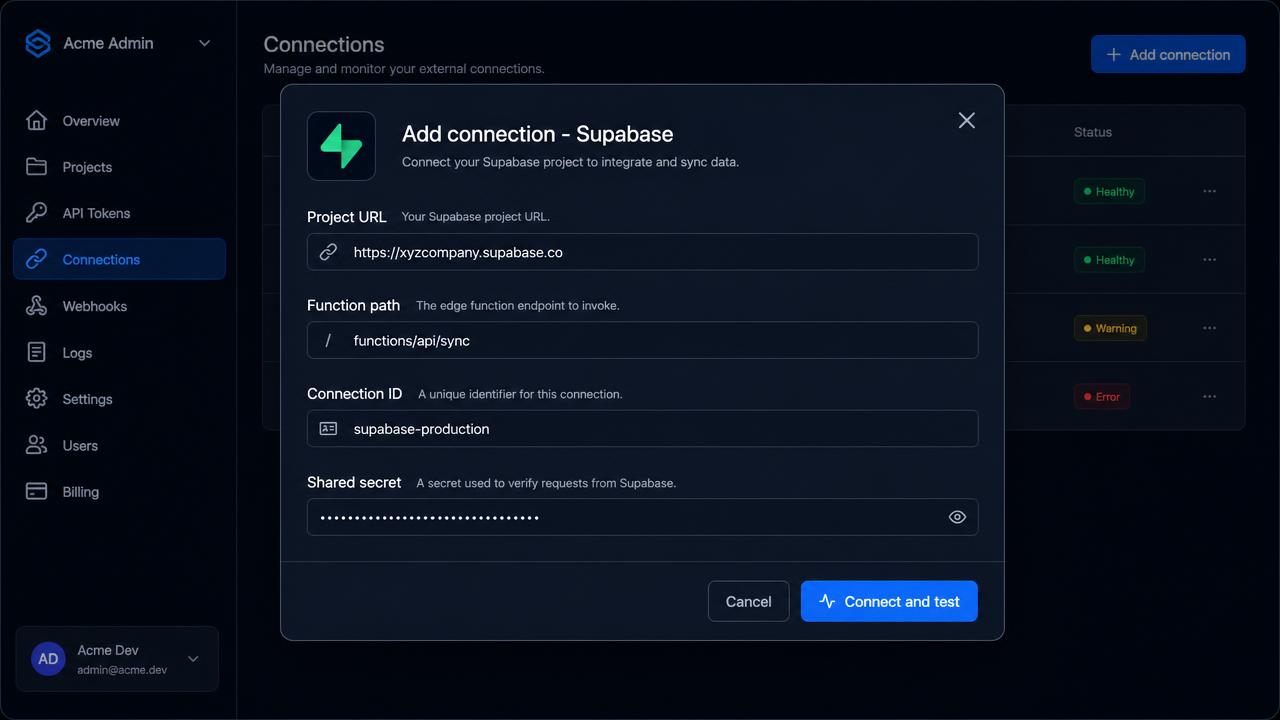
The shared secret is stored, never shown again
It goes straight into an encrypted vault. If you lose your copy, rotate AEMC_SHARED_SECRET in Supabase and update the connection with the new value.
10. Connect and test
Click Connect and test. AI Explorer Media performs an unsigned liveness probe, then a signed handshake against your function.
| Check | What it proves |
|---|---|
| Reachability | The function is deployed and publicly routable. |
| Signature | Your shared secret matches, and the clock skew is acceptable. |
| Version | The connector release is compatible with this workspace. |
| Capabilities | Which operations your project grants. |
11. Discovery
Discovery reports the site name, the content types the connector found and the capabilities it grants. Nothing is assumed: whatever your project does not expose is reported as unsupported rather than emulated.
12. Schema mapping
The connector inspects one sample row per table to learn your column names — which column holds the body, the author, the featured image, the SEO fields — and which status words your project uses. Column names and value kinds are read; column values and article bodies are not.
| Setting | Default | What it maps |
|---|---|---|
| AEMC_CONTENT_TABLE | content | Your posts or documents table |
| AEMC_MEDIA_TABLE | media | Media library table (optional) |
| AEMC_TERMS_TABLE | terms | Categories and tags (optional) |
| AEMC_REVISIONS_TABLE | content_revisions | Revision history (optional) |
| AEMC_BODY_COLUMN | body, content, content_html, html | The authoritative article body |
| AEMC_SEO_COLUMN / AEMC_GEO_COLUMN | seo / geo | Metadata columns |
Mismatch? Point the variables at your real tables
Set the matching AEMC_*_TABLE or AEMC_*_COLUMN secret in Supabase, redeploy is not needed, then use Refresh schema on the connection card.
13. Review capabilities
The connection card shows a capability matrix — content, media, taxonomy, revisions, SEO, GEO and events. A capability your project cannot support reads Unsupported, and the matching actions stay disabled in the editor instead of failing later.
Next: run the initial sync